Bars as in taskbars, not alchohol stores.
Stop Using Bars
Bars are a waste of screen space and only serves as a distraction to the user. For context, these are what bars are:
Windows 10 bar:

Dank Material Shell bar:

I’ve been a bar noticer for many years. On Windows, I can’t say I ever noticed the bar, just knew it was there. As I went further into Linux, I noticed the bar on my first window manager: DWM. I configured DWM’s bar with something similar to i3blocks I don’t remember the exact name. If you’ve had to configure something like getting the time for your system or what the music player is playing right now, you’ll naturally become interested in bars too.
What’s the Alternative?
First we need to identify what a bar does for us. Here are some features of a bar in a window manager:
- workspaces
- time
- date
- battery
- brightness
- volume
- internet control
- …
The only one here that I would argue is unnecessary are workspaces. In what situation would you forget which workspace you are in? My habit is to put windows in designated workspaces, eg. browser in workspace 2, messaging apps in workspace 4, gaming on workspace 6. This is likely how the majority of people use workspaces as well seeing as this is how 90% of the window managers I’ve used designs their workspaces.
For the rest like time, date, battery… There’s no real need to be viewing that at all times of the day right? I argue that is it better to not have it on the screen and instead be toggled when you want to see them.
Here are the implementations I’ve tried.
Widgets
The first alternative I thought of was using something like DMS’ widgets. At the time quickshell wasn’t as popular yet so my first attempt was with conky. Conky worked well but I could only view it on an empty workspace and if it was overlayed, it blocked critical areas of the screen.
The second thing I tried was EWW. I spent a while getting EWW to work well. The configuration language is a custom declarative configuration language that confused me quite a bit. Eventually I got the set up to what I wanted but unfortunately I couldn’t make it look nice in CSS.
When quickshell got popular, I tried to learn that and implement something on my own, but the configuration and programming aspect filtered me out. I don’t know how to write CSS, let alone JS. This made me quit on a widget based “bar.”
Notifications
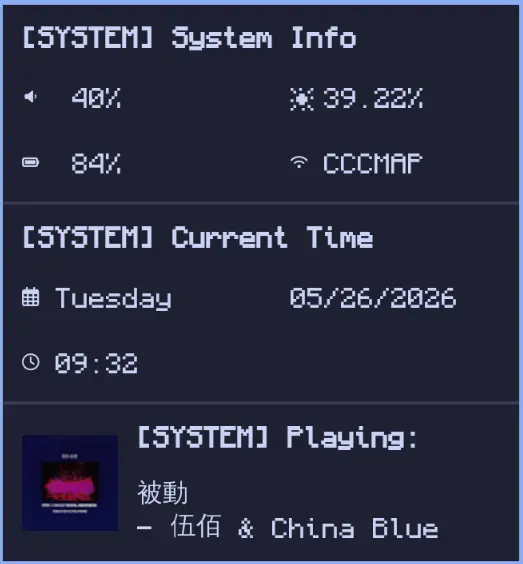
This is the only solution that I came up with that was easy to implement, looked like it belonged with the system, and has the best performance.
All it is is a script that runs commands in the shell, stores it into a variable, then sent with notify-send.
I’m using dunst which is themed by stylix and the window definitions are done by niri. Because of this, there’s no need to theme it (although I might add rounded corners via layer rules in niri). There’s no need to configure it because it’s just dunst. The best thing about it is that it takes so little battery. Each run only runs very basic commands that you would do on the CLI anyways, then displays something to the screen that you already have on!
In the image above, I display all my notifications. There are 3 separate notifications that serve specific purposes: System info, time, and the music player. This covers about every function that I mentioned a bar should serve.
If you are interested, here are the scripts.
#!/usr/bin/env sh
# time.sh
DATE=$(date +%m/%d/%Y)
TIME=$(date +%H:%M)
DAY_OF_WEEK=$(date +%A)
notify-send -e -u normal -t 5000 "[SYSTEM] Current Time" "\n $DAY_OF_WEEK\t$DATE\n\n $TIME"
#!/usr/bin/env bash
# system-info.sh
BRIGHTNESS_LEVEL=$(x=$(brightnessctl g) ; printf %.2f\\n "$(((10**9 * x/255)*100))e-9")
VOL_LEVEL=$(pamixer --get-volume | tr -d '[:space:]')
read -r BAT_LEVEL < /sys/class/power_supply/BAT1/capacity
WIFI_SSID=$(nmcli con show --active | grep wifi | cut -d ' ' -f 1)
ETH=$(nmcli con show --active | grep ethernet | cut -d ' ' -f 1)
if [[ -z "$WIFI_SSID" ]]; then
SSID="$ETH"
else
SSID="$WIFI_SSID"
fi
SSID=${SSID:-"N/a"}
case $BAT_LEVEL in
[0-9]|1[0-9]|2[0-4]) BAT_ICON="" ;;
2[5-9]|3[0-9]|4[0-4]) BAT_ICON="" ;;
4[5-9]|5[0-9]) BAT_ICON="" ;;
6[0-9]|7[0-5]) BAT_ICON="" ;;
7[6-9]|8[0-9]|9[0-9]|100) BAT_ICON="" ;;
*) BAT_ICON="N/a" ;;
esac
if [[ "true" == "$(pamixer --get-mute)" ]]; then
VOL_LEVEL=0
fi
case $VOL_LEVEL in
0) VOL_ICON="" ;;
[1-9]|1[0-9]|2[0-9]|3[0-9]|4[0-9]|50) VOL_ICON="" ;;
5[1-9]|6[0-9]|7[0-9]|8[0-9]|9[0-9]|100) VOL_ICON="" ;;
*) VOL_ICON="N/a" ;;
esac
notify-send -e -u normal -t 7000 "[SYSTEM] System Info" "\n$VOL_ICON $VOL_LEVEL%\t\t☀︎ $BRIGHTNESS_LEVEL%\n\n$BAT_ICON $BAT_LEVEL%\t\t $SSID"
#/usr/bin/env bash

# music-player.sh

STATUS=$(playerctl status)
TITLE=$(playerctl metadata title)
ALBUM=$(playerctl metadata album)
ARTIST=$(playerctl metadata artist)
ALBUMART=$(playerctl metadata mpris:artUrl)

notify-send -e -u normal -t 7000 -i $ALBUMART "[SYSTEM] $STATUS:" "\n$TITLE\n- $ARTIST"